Kali365 PhaaS: Inside the Attack Infrastructure



During a single shift, a Todyl MXDR analyst noticed something that most automated systems would have missed: the same IP address kept appearing across separate Business Email Compromise (BEC) investigations.
In threat intelligence, that kind of repetition is a signal. And when our analyst followed it, it led directly to a live, fully operational instance of one of the most capable Phishing-as-a-Service (PhaaS) kits currently being abused in the wild: Kali365.
The domain was three days old. It had zero detections across every major threat intelligence vendor on VirusTotal. The operator panel was open for business, accepting new subscriptions at $250/month. And none of the standard defenses had flagged it.
Here's what we found, and what it means for anyone defending a Microsoft 365 environment.
What is Kali365?
Kali365 is a commercially operated, full-stack attack platform that’s distributed via Telegram, priced at approximately $250/month (paid in Bitcoin), and engineered to give threat actors with minimal technical skill the ability to run sophisticated credential-harvesting campaigns at scale.
First documented publicly by Palo Alto Networks Unit 42 in April 2026, Kali365 targets Microsoft 365 environments specifically. Its feature set is genuinely alarming:
Reverse proxy credential harvesting. The kit sits between the victim and the real Microsoft 365 login page, proxying the connection in real time. The victim sees a pixel-perfect replica of the Microsoft portal. What they don't see is that every keystroke (i.e., username, password, and MFA code) is captured and relayed to the attacker simultaneously.
Session token theft. After the victim completes their MFA challenge, the kit captures the authenticated session token. The attacker can import that token into their own browser and access the account independently. No password required, no MFA challenge triggered. The session is legitimate. Microsoft sees nothing unusual.
AI-enabled lure generation. A built-in AI chatbot lets operators generate convincing phishing emails, such as impersonating Microsoft, shared document alerts, or invoice notifications, without writing a single line of copy themselves.
Mailbox scanning and contact harvesting. Once a token is captured, the kit enumerates the victim's contacts and scans their inbox for high-value targets, feeding downstream Business Email Compromise campaigns.
B2B email sender. Operators can send phishing emails directly from the victim's compromised account. Those emails arrive from a real, trusted address with a real email history. They're nearly impossible for recipients to distinguish from genuine communications.
Cloudflare Worker deployment. Phishing pages are hosted on Cloudflare's infrastructure using Cloudflare Workers, exploiting its trusted reputation to evade URL-based detection and blocklists.
A full operator dashboard. Real-time visibility into captured credentials, active sessions, harvested contacts, and lure performance.
This is a criminal business with subscription pricing, referral incentives, and customer self-service onboarding. Any threat actor with $250 in Bitcoin and a Telegram account can stand up their own instance.
What We Found: The Kali365 Infrastructure
The investigation began with IP address 66.179.30.87 that appeared across multiple BEC cases. WHOIS and RDAP data tied it to BL Networks, a hosting provider in Sheridan, Wyoming whose infrastructure carries characteristics typical of bulletproof hosting: tolerant of abuse complaints, resistant to takedown requests.
The associated domain, securehubcloud[.]com, was registered May 16, 2026, exactly three days before discovery. The name is deliberate: "secure," "hub," and "cloud" are words chosen to evoke trusted enterprise technology.
The infrastructure was built for speed and evasion:
- Registrar: NameSilo, with WHOIS privacy via PrivacyGuardian[.]org
- DNS: Managed through Cloudflare
- SSL certificate: Wildcard cert issued by Let's Encrypt on the same day as domain registration — automated, rapid, built to move fast
Subdomain reconnaissance revealed the operational architecture clearly:
The real server is hidden behind Cloudflare. The origin subdomain points directly to the IP, which is a common backend pattern. Everything else is fronted, giving the operator evasion and DDoS protection simultaneously.
Port scanning surfaced four open ports:
- Port 22 - OpenSSH 9.9p1 (remote management)
- Port 80 - nginx 1.26.3 (HTTP)
- Port 443 - nginx 1.26.3 (HTTPS)
- Port 8443 - nginx 1.26.3 (secondary HTTPS - panel access)
That dual-port structure is telling: port 443 serves the victim-facing phishing portal; port 8443 serves the operator panel. URL paths observed across both endpoints included /login, /register, and /forgot-password, which is consistent with the self-service onboarding design confirmed in the panel screenshots.
What the Panel Looked Like
During reconnaissance, two panel interfaces were captured, providing a rare, direct look at the attacker-facing side of a live PhaaS deployment.
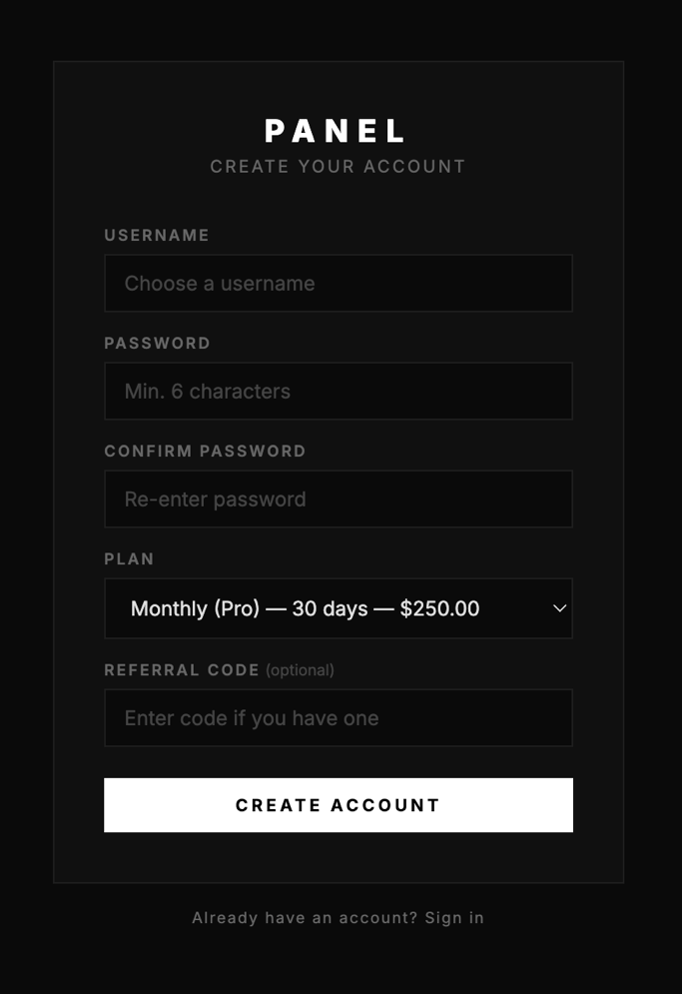
The first was a dark-themed registration page titled "PANEL — CREATE YOUR ACCOUNT." The subscription plan field was pre-populated: Monthly (Pro) — 30 days — $250.00. There was also an optional referral code field, confirming that Kali365 operates an affiliate model. Operators can recruit other operators and earn a cut of their subscription fees. This is incentivized criminal growth.
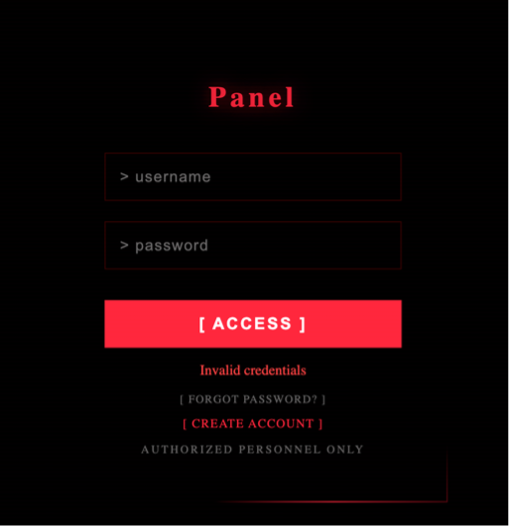
The second was a stark login interface: red text on black, terminal-style input fields, a bold red [ ACCESS ] button, and a footer reading "AUTHORIZED PERSONNEL ONLY." Links for "FORGOT PASSWORD" and "CREATE ACCOUNT" sat at the bottom, with no invitation required beyond payment.
How Kali365 Operates in the Wild
This is the part that matters most for defenders: MFA, on its own, does not stop Kali365.
Here's why. Because the kit uses a reverse proxy architecture, the victim's interaction with the Microsoft portal is real. They complete their actual MFA challenge. By the time the attacker captures the post-authentication session token, MFA has already been satisfied. The token is valid. The session is legitimate. There's no anomalous authentication event to detect.
From Microsoft's perspective, a user logged in, passed MFA, and started a session. Looks completely normal.
From the attacker's perspective, they now have a fully authenticated session they can use immediately to read the victim's inbox, extract contacts, impersonate them in follow-on phishing campaigns, scan the tenant for admin accounts, and, if they find one, reset passwords, disable users, or create new accounts inside the organization.
This is the uncomfortable truth Kali365 forces defenders to confront: authentication controls protect the door. These attackers are walking through it and then behaving as if they belong.
The Detection Gap Fresh Infrastructure Creates
At the time of discovery, securehubcloud[.]com had zero malicious detections across all major threat intelligence vendors on VirusTotal.
Threat actors running PhaaS kits know that spinning up fresh domains and IPs faster than blocklists can update is a viable evasion approach. By the time a domain gets flagged and added to a threat feed, it may have already served its full operational purpose and been abandoned.
The answer to this strategy isn't faster blocklists. Blocklists are inherently reactive, they document what has already been seen. Against freshly deployed infrastructure, they're close to useless.
The answer is behavioral detection: monitoring what happens after authentication, not just at the authentication event itself. The signals that matter aren't "this domain is on a blocklist,” they're:
- Anomalous login locations immediately following a successful MFA challenge
- Unexpected email forwarding rules created seconds after authentication
- Bulk contact exports from a mailbox that doesn't usually do that
- Inbox access from a new IP or device with no prior history
- Admin role scanning or unusual privilege escalation within a tenant
These are behavioral indicators. They don't require the domain to be known. They require someone, or something, to be watching what happens next.
The Indicators From This Investigation
The following indicators of compromise (IOCs) were surfaced directly from this investigation:
These should be added to your detection and blocking lists. But as this investigation illustrates, IOCs alone aren't enough.
What Defenders Should Do
Enable Conditional Access Policies. Restrict session token use to compliant, managed devices. Token theft is far less effective when the stolen token can't be used from an unmanaged browser or IP.
Monitor post-authentication behavior. Set detection rules for forwarding rule creation, mass contact export, and inbox access from new locations occurring immediately after authentication, especially MFA authentication.
Implement sign-in risk policies. Microsoft Entra ID can flag sign-ins from unfamiliar locations or anonymous IPs. Pair these with step-up authentication requirements or automatic session revocation.
Shorten session token lifetimes. Reducing how long an authenticated session remains valid limits the window an attacker has to exploit a stolen token.
Invest in identity-centric monitoring. Detection that starts and ends at the authentication event is insufficient against adversary-in-the-middle (AiTM) attacks. Identity monitoring needs to extend into what happens inside the session.
Correlate across cases. This discovery started with one analyst noticing the same IP across multiple investigations. That kind of cross-case correlation is a detection capability that requires analysts who are empowered to look across incidents, not just close tickets.
The Bigger Picture
What started as one IP address appearing multiple times across several BEC cases became the discovery of a live, actively monetized PhaaS operation that’s open for business, undetected by every major threat intelligence vendor, and operating on infrastructure that was three days old.
The Kali365 kit is not a novel threat. But this investigation is a clear illustration of how the modern phishing threat has evolved: sophisticated, commoditized, and deliberately designed to outpace the defenses most organizations rely on.
Blocklists and MFA are necessary. They are not sufficient.
The defenders who will catch these attacks are the ones correlating signals across cases, monitoring behavioral anomalies inside authenticated sessions, and building detection that assumes compromise is possible even after MFA has passed.
The attack surface is evolving. So must your detection capabilities and defenses.

About Josh Rykowski
Josh Rykowski leads the strategy and operations behind Todyl's MXDR services. He oversees a high-performing team delivering 24/7 threat detection, response, and continuous improvement. Prior to joining Todyl, Josh served as a strategic leader across multiple Army commands, driving forward-looking cybersecurity initiatives while managing projects that proactively strengthen defenses and modernize outdated processes.
Josh's entrepreneurial mindset bridges gaps between technology and real-world needs. He's led the creation of coding challenges that deepen developer engagement, and built a user-friendly platform to spotlight Montana’s craft alcohol scene, boosting visibility through smart SEO and gamification. He's built high-performing teams centered on clear communication, ownership, and innovation, whether it's advancing cybersecurity or lifting up local industries.

AI Defense Readiness Assessment
Evaluate your security posture against AI-powered attacks and get recommendations to close any gaps.

Stay on the Cutting Edge of Security
Subscribe to our newsletter to get our latest insights.